
Use existing bitHuman agents in real-time applications with our cloud-hosted LiveKit plugin. The avatar runs on bitHuman’s servers — no model files, no GPU needed on your side.
New here? Read How It Works first to understand rooms, sessions, and avatars.

Quick Start

1

Install the plugin

The bitHuman plugin ships inside the livekit/agents repository. Remove any PyPI version first to avoid conflicts, then install from GitHub:
# Remove old PyPI version if present (safe to ignore "not installed" warnings)
uv pip uninstall livekit-plugins-bithuman

# Install the latest version
GIT_LFS_SKIP_SMUDGE=1 uv pip install git+https://github.com/livekit/agents@main#subdirectory=livekit-plugins/livekit-plugins-bithuman
2

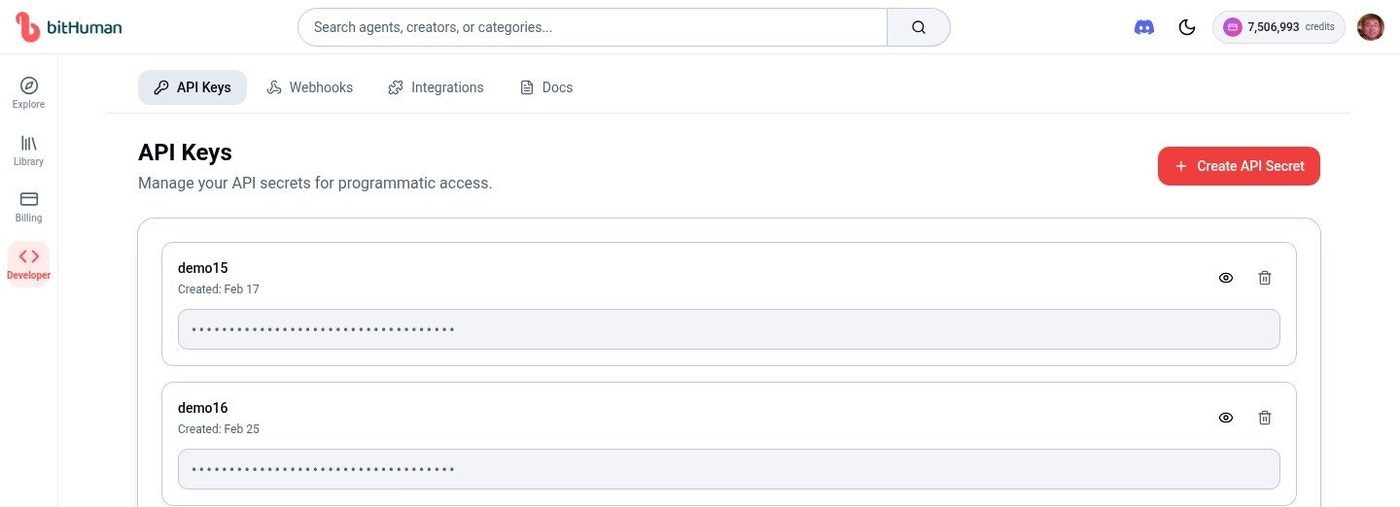
Get your API Secret

Go to Developer → API Keys and copy your API Secret.API Keys
3

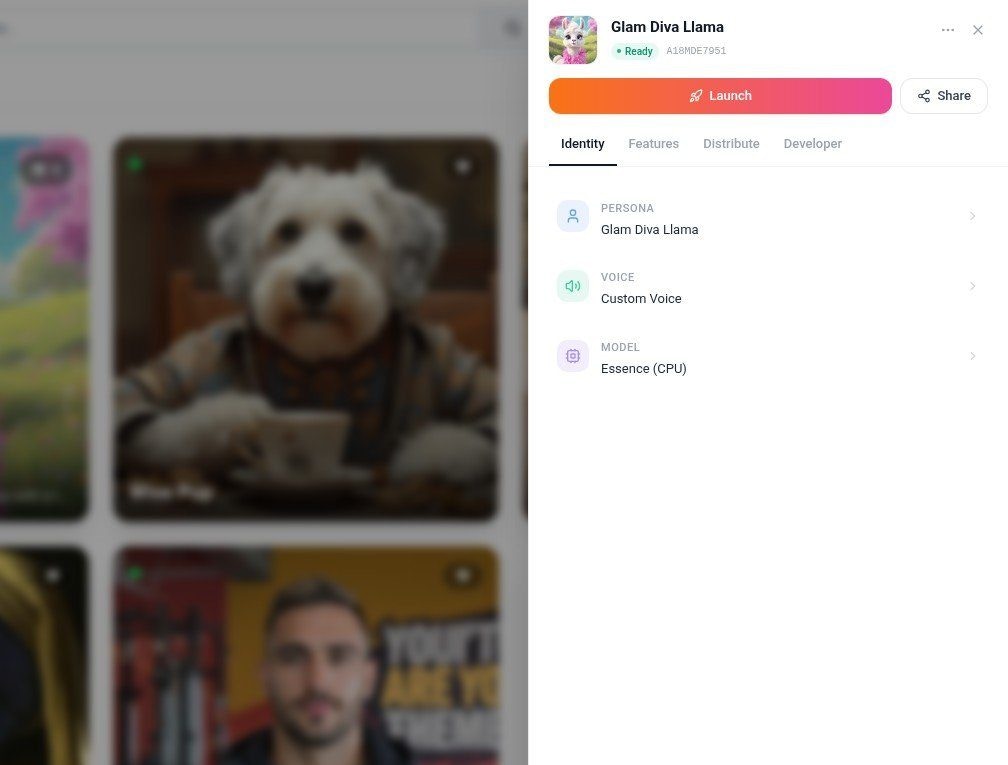
Find your Agent ID

Go to your Library and click any agent. The side panel shows your Agent ID (e.g., A18MDE7951).Agent Settings
4

Set environment variables

export BITHUMAN_API_SECRET="your_api_secret"
export BITHUMAN_AGENT_ID="A78WKV4515"
export OPENAI_API_KEY="sk-..."

# LiveKit (get from cloud.livekit.io)
export LIVEKIT_URL="wss://your-project.livekit.cloud"
export LIVEKIT_API_KEY="APIxxxxxxxx"
export LIVEKIT_API_SECRET="xxxxxxxx"

Complete Working Example

Here’s a full agent that uses a cloud-hosted avatar:
import asyncio
import os
from livekit.agents import (
    Agent,
    AgentSession,
    JobContext,
    RoomOutputOptions,
    WorkerOptions,
    cli,
    llm,
)
from livekit.plugins import openai, silero, bithuman

class MyAgent(Agent):
    def __init__(self):
        super().__init__(
            instructions="""You are a friendly assistant.
            Keep responses to 1-2 sentences.""",
        )

async def entrypoint(ctx: JobContext):
    # Connect to the LiveKit room
    await ctx.connect()

    # Wait for a human to join
    await ctx.wait_for_participant()

    # Create a cloud-hosted avatar
    avatar = bithuman.AvatarSession(
        avatar_id=os.getenv("BITHUMAN_AGENT_ID"),
        api_secret=os.getenv("BITHUMAN_API_SECRET"),
    )

    # Wire up the AI pipeline
    session = AgentSession(
        stt=openai.STT(),              # Listens to the user
        llm=openai.LLM(),              # Generates responses
        tts=openai.TTS(),              # Converts text to speech
        vad=silero.VAD.load(),         # Detects when user is speaking
    )

    # Start — avatar joins room and begins animating
    await avatar.start(session, room=ctx.room)

    await session.start(
        agent=MyAgent(),
        room=ctx.room,
        room_output_options=RoomOutputOptions(audio_enabled=False),
    )

if __name__ == "__main__":
    cli.run_app(WorkerOptions(entrypoint_fnc=entrypoint))
Run it:
python agent.py dev
Open agents-playground.livekit.io and talk to your avatar.

What Happens When You Run This

  1. Your agent connects to a LiveKit room and waits for a user
  2. When a user joins, AvatarSession sends a request to bitHuman’s cloud
  3. A cloud avatar worker downloads the model (cached after first time) and joins the room
  4. The user speaks → STT transcribes → LLM responds → TTS generates audio → Avatar animates
  5. The avatar publishes video to the room — the user sees a talking face

Avatar Modes

Essence Model (CPU) — Default

Pre-built avatars with full body support, animal mode, and fast response times.
avatar = bithuman.AvatarSession(
    avatar_id="A78WKV4515",
    api_secret="your_api_secret",
)

Expression Model (GPU) — Agent ID

Higher-fidelity face animation for platform-created agents.
avatar = bithuman.AvatarSession(
    avatar_id="A78WKV4515",
    api_secret="your_api_secret",
    model="expression",
)

Expression Model (GPU) — Custom Image

Create an avatar from any face image on-the-fly.
from PIL import Image

avatar = bithuman.AvatarSession(
    avatar_image=Image.open("face.jpg"),
    api_secret="your_api_secret",
    model="expression",
)

Model Comparison

FeatureEssence (CPU)Expression (GPU)
PersonalitiesPre-trainedDynamic
Response timeFaster (~2s)Standard (~4s)
Body supportFull body + animal modeFace and shoulders
Animal modeYesNo
Custom imagesNoYes

Adding Gestures (Dynamics)

Make the avatar wave, nod, or laugh in response to conversation keywords.

Step 1: Get Available Gestures

import requests
import os

agent_id = os.getenv("BITHUMAN_AGENT_ID")
headers = {"api-secret": os.getenv("BITHUMAN_API_SECRET")}

response = requests.get(
    f"https://api.bithuman.ai/v1/dynamics/{agent_id}",
    headers=headers,
)
gestures = response.json()["data"].get("gestures", {})
print(list(gestures.keys()))
# Example: ["mini_wave_hello", "talk_head_nod_subtle", "laugh_react"]

Step 2: Trigger on Keywords

from livekit.agents import UserInputTranscribedEvent
from livekit import rtc
import json
from datetime import datetime

KEYWORD_ACTION_MAP = {
    "laugh": "laugh_react",
    "funny": "laugh_react",
    "hello": "mini_wave_hello",
    "hi": "mini_wave_hello",
}

async def send_dynamics_trigger(
    local_participant: rtc.LocalParticipant,
    destination_identity: str,
    action: str,
) -> None:
    await local_participant.perform_rpc(
        destination_identity=destination_identity,
        method="trigger_dynamics",
        payload=json.dumps({
            "action": action,
            "identity": local_participant.identity,
            "timestamp": datetime.utcnow().isoformat(),
        }),
    )

# Add this after session.start() in your entrypoint:
@session.on("user_input_transcribed")
def on_user_input_transcribed(event: UserInputTranscribedEvent):
    if not event.is_final:
        return
    transcript = event.transcript.lower()
    for keyword, action in KEYWORD_ACTION_MAP.items():
        if keyword in transcript:
            for identity in ctx.room.remote_participants.keys():
                asyncio.create_task(
                    send_dynamics_trigger(
                        ctx.room.local_participant, identity, action
                    )
                )
            break
Gesture actions vary by agent. Always check the Dynamics API response first to see what’s available for your specific agent.

Configuration

ParameterTypeRequiredDescription
avatar_idstringYes*Agent ID from your Library
avatar_imagePIL.ImageYes*Face image for on-the-fly avatar (Expression only)
api_secretstringYesYour API secret
modelstringNo"essence" (default) or "expression"
*Either avatar_id or avatar_image is required.

Cloud Advantages

  • No Local Storage — No large model files to download or manage
  • Auto-Updates — Always uses the latest model versions
  • Scalability — Handles multiple concurrent sessions automatically
  • Cross-Platform — Works on any device with internet

Pricing

Visit Billing or click the credit balance in the top navigation for current pricing. Free Tier: 99 credits per month, community support Pro: Contact sales for unlimited credits and priority support

Troubleshooting

ProblemSolution
Authentication errorsVerify API secret at Developer → API Keys
Avatar doesn’t appearCheck agent_id exists in your Library
Network timeoutsEnsure stable internet; the plugin retries automatically
Plugin installation failsUse uv with GIT_LFS_SKIP_SMUDGE=1 flag
No lip movementEnsure avatar.start(session, room=ctx.room) is called before session.start()

Next Steps